I am trying to limit my vertical axis scale to 1 - 40. I have set “min value” to 1 and “max value” to 40, but it is still showing 0 - 45. Does anyone have an idea how to override these values?
Additionally would like the increments to be in 5.
I’ve tested the issue you’re experiencing, and it appears that when the Y-axis is reversed, Highcharts ignores the tickInterval setting and automatically calculates its own range to best fit the chart. This is likely what’s causing the unexpected behavior in your setup.
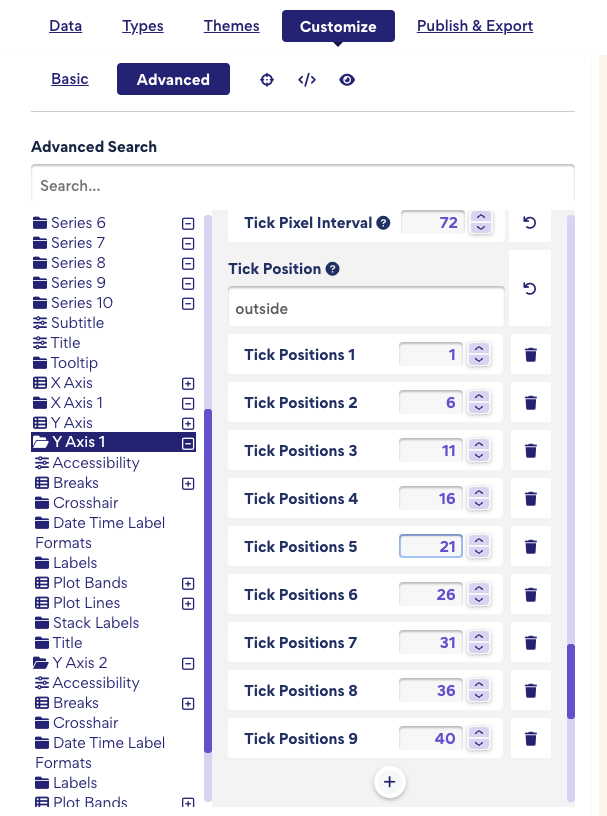
To apply a strict range from 1 to 40 with an interval of 5, you’ll need to manually define the tick positions. You can do this by going to:
Customize → Advanced → Y Axis 1 → Tick Positions
You’ll need to do the same for Y Axis 2 if it’s also reversed.
One thing to keep in mind: if you’re using a step of 5 and want to start at 1, the last tick in the sequence will be 41 (i.e., 1, 6, 11, …, 36, 41). If you want the last tick to be exactly 40 instead, that’s also fine—just note that the final gap will be 4 instead of 5.